Introduction

Many programming languages rely on library functions for string handling. COBOL too, uses Intrinsic Functions for some tasks but most string manipulation is done using Reference Modification and the three string handling verbs : INSPECT, STRING and UNSTRING.

This unit examines the first of three string handling verbs and aims to provide you with a solid understanding of its various formats and modifying phrases.
By the end of this unit you should:

  1. Understand how the INSPECT verb works.
  2. Have a good knowledge of the different formats and modifying phrases of the INSPECT verb.
  3. Be able to use the INSPECT to count, replace and convert characters in a string.

To simplify the syntax diagrams and reduce the number of rules that must be explained, special operand endings are used in this unit's syntax diagrams.

These operand endings have the following meaning:

$i uses an alphanumeric data item
$il uses an alphanumeric data item or a string literal
#i uses a numeric data item
#il uses a numeric data item or numeric literal
$#i uses a numeric or an alphanumeric data item

Using the INSPECT

The INSPECT has four formats;

  1. The first format is used for counting characters in a string.
  2. The second replaces a group of characters in a string with another group of characters.
  3. The third combines both operations in one statement.
  4. The fourth format converts each of a set of characters to its corresponding character in another set of characters.

We'll start by looking at the PROCEDURE DIVISION of an example program that uses the INSPECT verb. This program reads through a file, counts how many times each letter of the alphabet occurs and displays the results

To do this the program;

  • Reads in a line of text
  • Converts all the characters to upper case using the INSPECT..CONVERTING
  • Counts the number of times each letter appears in the line using the INSPECT..TALLYING and increments the count in LetterCount. It gets the letters from inspection from a pre-defined table of letters (see the unit on tables for the definition of this letter table)
  • Uses a PERFORM..VARYING to display the counts after they have been accumulated.
PROCEDURE DIVISION.
Begin.
    OPEN INPUT TextFile
    READ TextFile
      AT END SET EndOfFile TO TRUE
    END-READ
    PERFORM UNTIL EndOfFile
       INSPECT TextLine
           CONVERTING "abcdefghijklmnopqrstuvwxyz"
               TO     "ABCDEFGHIJKLMNOPQRSTUVWXYZ"
       PERFORM VARYING idx FROM 1 BY 1 UNTIL idx > 26
          INSPECT TextLine TALLYING LetterCount(idx)
                     FOR ALL Letter(idx)
       END-PERFORM
       READ TextFile
          AT END SET EndOfFile TO TRUE
       END-READ
    END-PERFORM
    PERFORM VARYING idx FROM 1 BY 1 UNTIL idx > 26
       DISPLAY "Letter " Letter(idx)
            " occurs " LetterCount(idx) " times"
    END-PERFORM
    CLOSE TextFile
    STOP RUN.

The INSPECT scans the source string from left to right counting, replacing or converting characters under the control of the TALLYING, REPLACING or CONVERTING phrases.

The behavior of the INSPECT is modified by using the LEADING, FIRST, BEFORE and AFTER phrases.

An ALL, LEADING, CHARACTERS, FIRST or CONVERTING phrase may only be followed by one BEFORE and one AFTER phrase.


The LEADING phrase causes counting/replacement of all Compare$il characters from the first valid one encountered to the first invalid one.

The FIRST phrase causes only the first valid character to be replaced.

The BEFORE phrase designates as valid those characters to the left of the delimiter associated with it.

The AFTER phrase designates as valid those characters to the right of the delimiter associated with it.

If the delimiter is not present in the SourceStr$i then using the BEFORE phrase implies the whole string and using the AFTER phrase implies no characters at all.


The counting INSPECT

Syntax

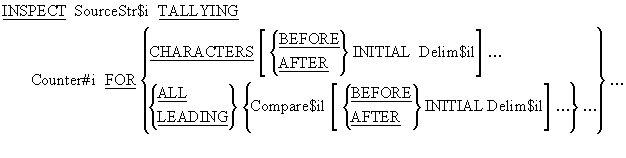
INSPECT TALLYING (counting) syntax diagram

This format of the Inspect is used to count characters in a string.


If Compare$il or Delim$il is a figurative constant it is 1 character in size.

An ALL, LEADING or CHARACTERS phrase can have not more than one BEFORE and one AFTER phrase following it.

INSPECT FullName TALLYING UnstrPtr FOR LEADING SPACES.

INSPECT SourceLine TALLYING ECount
        FOR ALL "e" AFTER  INITIAL "start"
                    BEFORE INITIAL "end".   

The replacing INSPECT

Syntax

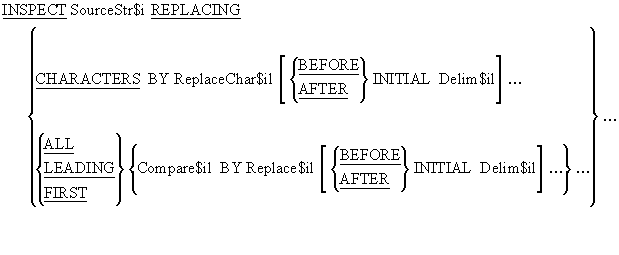
INSPECT REPLACING syntax diagram

This format of the INSPECT is used to replace characters in a string.


The sizes of Compare$il and Replace$il must be equal.

When Replace$il is a figurative constant its size equals that of Compare$il.

When there is a CHARACTERS phrase, the size of ReplaceChar$il and the delimiter which may follow it (Delim$il) must be one character.

If Compare$il, Delim$il or Replace$il is a figurative constant it is 1 character in size.


The following examples work on the data in StringData to produce the results shown in the storage schematic below.

Click on the storage schematic to see the result of each of these INSPECT statements (use left click or PageDown for next item and right click or PageUp for previous item) .


1. INSPECT StringData REPLACING ALL "R" BY "G"
       AFTER INITIAL "A" BEFORE INITIAL "Q".

2. INSPECT StringData REPLACING LEADING "R" BY "G"
       AFTER INITIAL "A" BEFORE INITIAL "Z".

3. INSPECT StringData REPLACING ALL "R" BY "G"
       AFTER INITIAL "A" BEFORE INITIAL "Z".

4. INSPECT StringData REPLACING FIRST "R" BY "G"
       AFTER INITIAL "A" BEFORE INITIAL "Q".

5. INSPECT StringData REPLACING
       ALL "RRRR" BY "FROG"
       AFTER INITIAL "A" BEFORE INITIAL "Q".


This example inspects the string TextLine and checks it for each of the 4 letter swear words in the table. If one is found it is replaced by the text *#@!.

PERFORM VARYING idx FROM 1 BY 1 UNTIL idx > 10
  INSPECT TextLine REPLACING SwearWord(idx) BY "*#@!"
END-PERFORM

In this example we want to create an edited item with a floating Rouble currency symbol instead of a floating dollar sign.

To achieve we use a picture clause edited with a floating dollar sign and then we use the INSPECT to replace the dollar sign with the Rouble symbol "R".

This works because when a value is moved into an edited item the editing is immediately applied to the value.

Click on the diagram below to see how this use of the INSPECT works (use left click or PageDown for next item and right click or PageUp for previous item) .


The combined INSPECT

Syntax

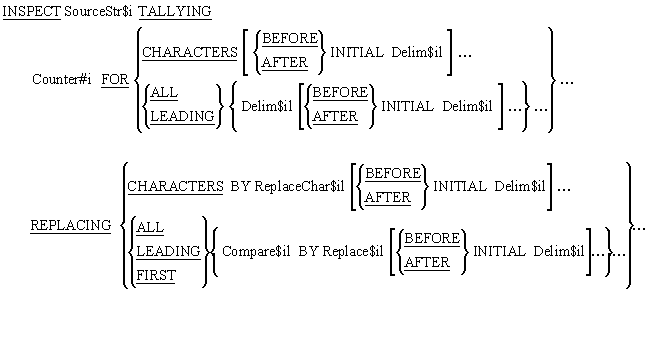
INSPECT combined TALLYING and REPLACING syntax diagram

This format of the INSPECT combines the syntactic elements of the previous two formats allowing both counting and replacing to be done in one statement.


The converting INSPECT

Syntax

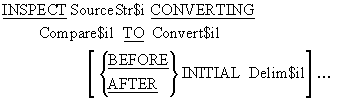
INSPECT CONVERTING syntax diagram


The INSPECT..CONVERTING works on individual characters. Compare$il is a list of characters that will be replaced with the characters in Convert$il on a one for one basis.

For instance the statement -

INSPECT StringData CONVERTING "abc" TO "XYZ". 

replaces "a" with "X", "b" with "Y" and "c" with "Z".


  1. Compare$il and Convert$il must be equal in size.
  2. When Convert$il is a figurative constant its size equals that of Compare$il.
  3. The same character cannot appear more than once in the Compare$il (because each character in the Compare$il string is associated with a replacement).

The following examples work on the data in StringData to produce the results shown in the storage schematic below.

Click on the storage schematic to see the result of each of these INSPECT statements (use left click or PageDown for next item and right click or PageUp for previous item).


1. INSPECT StringData CONVERTING "fxtd" TO "ZYAB".

2. INSPECT StringData REPLACING "fxtd" BY "ZYAB".

3. INSPECT StringData REPLACING ALL "x" BY "Y"
                                    "d" BY "Z"
                                    "f" BY "S".


This example shows how the INSPECT..CONVERTING can be used to implement a simple encoding mechanism.

It converts the character 0 to character 5, 1 to 2, 2 to 9, 3 to 8 etc. Conversion starts when the word "codeon" is encountered in the string and stops when "codeoff" is encountered.

INSPECT TextLine
    CONVERTING "0123456789" TO "5298317046"
    AFTER INITIAL "codeon" BEFORE INITIAL "codeoff". 

In this example, the INSPECT..CONVERTING is used to convert upper case letters to lower case and visa versa.

The first INSPECT shows how we can convert the characters using string literals and the next two show how storing the strings in data items makes the conversion operation more versatile.

Actually, these days we can do this with the UPPER-CASE and LOWER-CASE Intrinsic Functions.

*> Data Division entries
01 AlphaChars.
   02 AlphaLower PIC X(26) VALUE "abcdefghijklmnopqrstuvwxyz".
   02 AlphaUpper PIC X(26) VALUE "ABCDEFGHIJKLMNOPQRSTUVWXYZ".

*> Procedure Division entries
    INSPECT CustAddress
        CONVERTING "abcdefghijklmnopqrstuvwxyz"
            TO     "ABCDEFGHIJKLMNOPQRSTUVWXYZ".

    INSPECT CustAddress
        CONVERTING AlphaLower TO AlphaUpper.
    INSPECT CustAddress
        CONVERTING AlphaUpper TO AlphaLower.