Introduction

The aim of this unit is to provide you with a solid understanding of declarations required for Relative files and the Procedure Division verbs used to process them.

An additional aim is to introduce you to the uses of Declaratives and declarations required for them.


By the end of this unit you should:

  1. Be able to write the ENVIRONMENT DIVISION and Data Division declarations required for a Relative file.
  2. Understand the difference between a file's access mode and its organization.
  3. Be able to use the START, OPEN, CLOSE, READ, WRITE, REWRITE and DELETE Procedure Division verbs required to process Relative files.
  4. Be able to process a Relative file directly or sequentially.
  5. Understand when, and how, to use Declaratives.

A look at some programs that use Relative files

We'll start by looking at some example programs. In the first program, a Relative file is created by reading records from a Sequential file and writing them to the Relative file. The second program demonstrates how a Relative file may be read directly and sequentially.

It is a good idea to download the program and use the animator to watch how the Relative file is created. You can download both the program and the sequential data file it uses.

Download Seq2Rel.cbl

Download SEQSUPP.dat


In this example we see how a Relative file may be read. The program allows the file to be read either directly, using a key, or sequentially.

Below we see the results produced by two runs of the program.

RUN USING SEQUENTIAL READING
Enter Read type (Direct=1, Seq=2)-> 2
  01  VESTRON VIDEOS        OVER THE SEA SOMEWHERE IN LONDON
  02  EMI STUDIOS           HOLLYWOOD, CALIFORNIA, USA
  03  BBC WILDLIFE          BUSH HOUSE, LONDON, ENGLAND
  04  CBS STUDIOS           HOLLYWOOD, CALIFORNIA, USA
  05  YACHTING MONTHLY      TREE HOUSE, LONDON, ENGLAND
  06  VIRGIN VIDEOS         IS THIS ONE ALSO LOCATED IN ENGLAND
  07  CIC VIDEOS            NEW YORK PLAZZA, NEW YORK, USA

RUN USING DIRECT READ
Enter Read type (Direct=1, Seq=2)-> 1
Enter supplier key (2 digits)-> 05
  05  YACHTING MONTHLY      TREE HOUSE, LONDON, ENGLAND

If you downloaded the first example program and its data file you should already have the Relative file (it was produced when you ran the first example program). You can use this file with the second Relative file example program.

Download ReadRelative.cbl

Relative file - Declarations

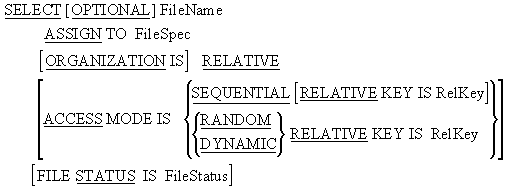
As we have seen in the example programs when Relative files are used a number of new entries for the SELECT and ASSIGN clause are required.


Syntax diagram for the SELECT and ASSIGN clause used to declare a relative file in COBOL.
SELECT and ASSIGN Clause Syntax

The OPTIONAL phrase must be specified for files opened for INPUT, I-O, or EXTEND that need not be present when the program runs.

The ACCESS MODE of a file refers to the way in which the file is to be used. If an ACCESS MODE of SEQUENTIAL is specified then it will only be possible to process the records in the file sequentially. If RANDOM is specified it will only be possible to access the file directly. If DYNAMIC is specified, the file may be accessed both directly and sequentially.

The RECORD KEY phrase is used to define the relative key. There can be only one key in a Relative File. The UniqueRecKey must be a numeric data item and must not be part of the file's record description although it may be part of another file's record description. It is normally described in the WORKING-STORAGE SECTION.

The FILE STATUS clause identifies a two character area of storage that holds the result of every I-O operation for the file. The FILE STATUS data item is declared as PIC X(2) in the WORKING-STORAGE SECTION. Whenever an I-O operation is performed, some value will be returned to FileStatus indicating whether or not the operation was successful.

There are a large number of FILE STATUS values but three of major interest are;

00 = Operation successful.

22 = Duplicate key. i.e. The record already exists.

23 = Record not found

22 may occur after an attempt to write a record and 23 after trying to READ or DELETE a record.

Note that although a code of 00 generally means the operation was successful there are other codes that also indicate success.


Relative file - file processing verbs

Direct access files can support a far greater range of operations than Sequential files. Just like Sequential files, direct access files support the OPEN, CLOSE, READ and WRITE operations. But in addition to these, direct access files also support the DELETE, REWRITE and START operations.

In this section we examine these new operations and any changes to the operations we are already familiar with.


When any of the file processing verbs are used for direct access, the INVALID KEY clause must be used unless declaratives have been specified.

When the INVALID KEY clause is specified, any I-O error, such as attempting to read a record that does not exist or write a record that already exists, will activate the clause and cause the statement block following it to be executed.


The syntax for the CLOSE is the same for all file organizations.

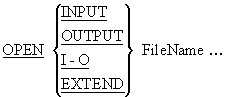
The full syntax for the OPEN verbs is shown below. Note the new I-O entry. This is used with direct access files when we intend to update or both read and write to the file.

Syntax diagram for the OPEN verb applied to relative files, showing INPUT, OUTPUT, I-O, and EXTEND modes.
OPEN Verb Syntax

Notes

If the file is opened for input then only READ and START will be allowed.

If the file is opened for output then only WRITE will be allowed.

If the file is opened for I-O then READ, WRITE, START, REWRITE and DELETE will be allowed.

If OPEN INPUT is used, and the file does not possess the OPTIONAL tag, then the file must exist or the OPEN will fail.

If OPEN OUTPUT or I-O is used then the file will be created if it does not already exist as long as the file possesses the OPTIONAL tag.


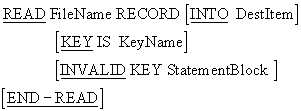
When a Relative file has an ACCESS MODE of SEQUENTIAL , the format of the READ is the same as for Sequential files, but when the ACCESS MODE is DYNAMIC or RANDOM, the READ has a different format.

Syntax diagram for the READ verb used to read a record directly from a relative file by key value.
READ Verb Syntax (Direct Access)

Operation

To read a record directly from a Relative file

  1. The key value must be placed in the KeyName data item (the KeyName data item is the area of storage identified as the relative key in the RECORD KEY IS phrase of the SELECT and ASSIGN clause).
  2. Then the READ must be executed.

When the READ is executed, the record with the Relative Record Number equal to the present value of the relative key (i.e.KeyName) will be read into the file's record buffer (defined in the FD entry).

If the record does not exist the INVALID KEY clause will activate and the statement block following the clause will be executed.

After the record has been read the next record pointer will be pointing to the next record in the file.

Notes

The file must have an ACCESS MODE declaration for the file specifying an ACCESS MODE DYNAMIC or RANDOM.

The file must be opened for I-O or INPUT.

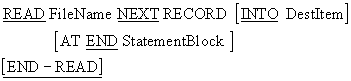
When the ACCESS MODE is DYNAMIC and we wish to read the file sequentially then we must use the format below for the READ. There is very little difference between this format and the format of the ordinary sequential READ except that in this format the NEXT RECORD phrase is used.

Syntax diagram for the sequential READ NEXT format used with relative files when ACCESS MODE is DYNAMIC.
READ NEXT Verb Syntax

Notes

This format is used to access a Relative file sequentially when the ACCESS MODE has been declared as DYNAMIC and the file has been opened for INPUT or I-O.

For Relative files the next record pointer may be positioned by the START verb or by doing a direct READ .

The READ NEXT will read the record pointed to by the next record pointer (This will be the current record if positioned by the START and the next record if positioned by a direct READ).

The AT END statement is activated when the end of the file has been reached


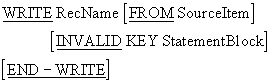
The format for writing sequentially to a Relative file is the same as that used for writing to a Sequential file, but to write directly to a Relative file a key must be used and this requires a different WRITE format.

Syntax diagram for the WRITE verb used to write a record directly to a relative file using a key value.
WRITE Verb Syntax (Direct Access)

Operation

To write a record directly to a Relative file

  1. The record value must be placed in the files record buffer.
  2. The key value must be placed in the file's relative key.
  3. The WRITE must be executed.

When the WRITE is executed the data in the record buffer is written to the record position with a Relative Record Number equal to the present value of the key.

Notes

The INVALID KEY clause must be used for direct access to Relative files. If the record being written already 'exists' the INVALID KEY clause will be activate and the statement following the clause will be done. Any other I-O error will also activate the INVALID KEY clause.


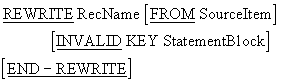
The REWRITE is used to update a record in situ by overwriting it. The format of the REWRITE verb is shown below.

Syntax diagram for the REWRITE verb used to update an existing record in place in a relative file.
REWRITE Verb Syntax

Operation

The REWRITE is normally used in the following way;

  1. The record we wish to update is read directly into the record buffer (place the key value in the key area and execute the READ).
  2. The required changes are made to the record in the buffer.
  3. The record in the buffer is rewritten to the file.

Notes

If the file has an ACCESS MODE of SEQUENTIAL then the INVALID KEY clause cannot be used but if the ACCESS MODE is RANDOM or DYNAMIC the INVALID KEY clause must be present (unless declaratives are being used).

When the file has ACCESS MODE IS SEQUENTIAL the record that is replaced must have been the subject of a READ or START before the REWRITE is used.

For all access modes the file must be opened for I-O.


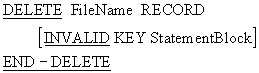
Syntax diagram for the DELETE verb used to remove a record from a relative file by its relative record number.
DELETE Verb Syntax

Operation

To delete a record

  1. The Relative Record Number of the record to be deleted must be placed in the file's relative key.
  2. Then the DELETE must be executed.

The record with the Relative Record number equal to the current value of the key area will be deleted.

Notes

To use the DELETE, the file must have been opened for I-O.

When the ACCESS MODE IS SEQUENTIAL a READ statement must access the record to be deleted.

When the ACCESS MODE IS RANDOM or DYNAMIC the record to be deleted is identified by the file's Relative key.

If the record does not exist the INVALID KEY statement will be activated.

Note that when a record is deleted its space does not become available to other records.


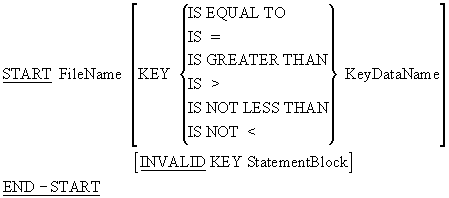
In Relative files, the only thing the START verb is used for, is to control the position of the next record pointer. Where the START verb appears in a program it is usually followed by a sequential READ or WRITE .

Syntax diagram for the START verb used to position the next-record pointer in a relative file.
START Verb Syntax

Operation

To position the Next Record Pointer at a particular record

  1. Move the Relative Record Number of the record to the file's relative key.
  2. Execute the START..KEY IS EQUAL TO

To position the Next Record Pointer at the first record in the file

  1. Move zeros to the file's relative key.
  2. Execute the START..KEY IS GREATER THAN

To position the pointer at the last record in the file

  1. Move all 9's to the file's relative key.
  2. Execute the START..KEY IS LESS THAN

Notes

KeyDataName is the file's relative key. It is the key of comparison.

The file must be opened for INPUT or I-O when the START is executed.

Execution of the START statement does not change the contents of the record area (i.e. the START does not actually read the record it merely positions the next record pointer).

When the START is executed the Next Record Pointer is set to the first record in the file whose key satisfies the condition. If no record satisfies the condition then the INVALID KEY clause is activated.


Introduction to Declaratives

Declaratives allow us to define exception handling procedures for files. When there are declaratives for a file the INVALID KEY clause is not required.


The template opposite shows how declaratives are set up.

Declaratives must be defined at the start of the PROCEDURE DIVISION.

They must start with the DECLARATIVES keyword and end with the keyword END-DECLARATIVES .

Declaratives are divided into sections and each section is associated with a particular USE phrase.

The sections and USE phrases allow us to specify a separate exception procedure for each file.

We can also specify general exception procedures for all INPUT, OUTPUT, I-O and EXTEND errors.

PROCEDURE DIVISION.
DECLARATIVES.
SectionOne SECTION.
    USE clause for file1.
ParSectOne1.
   ????????????????
   ????????????????
ParSectOne2.
   ????????????????
   ????????????????

SectionTwo SECTION.
    USE clause for file2.
ParSectTwo1.
   ????????????????
   ????????????????
ParSectTwo2.
   ????????????????
   ????????????????
END-DECLARATIVES.
Main SECTION.
Begin.

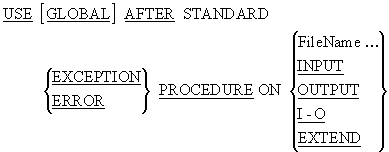
Syntax diagram for the USE phrase in COBOL Declaratives, specifying error-handling procedures for file I-O conditions.
USE Phrase Syntax

Notes

A USE statement can be used only in a sentence immediately after a section header in the PROCEDURE DIVISION declaratives area. It must be the only statement in the sentence.

ERROR and EXCEPTION are synonyms.

A Declarative cannot refer to a non-Declarative procedure. However, the PERFORM can transfer control from a Declarative procedure to another Declarative procedure or from a non-Declarative procedure to a Declarative procedure.

A Declarative executes automatically whenever an I-O condition occurs that would result in a non-zero value in the FILE STATUS data item.

When USE phrases refer to both a FileName and the more general INPUT, OUTPUT, I-O and EXTEND then the FileName procedure takes precedence.


 PROCEDURE DIVISION.
 DECLARATIVES.
 FileError SECTION.
    USE AFTER ERROR PROCEDURE ON RelativeFile.
 CheckFileStatus.
    EVALUATE TRUE
      WHEN RecordDoesNotExist  DISPLAY "Record does not exist"
      WHEN RecordAlreadyExists DISPLAY "Record already exists"
      WHEN FileNotOpen OPEN I-O RelativeFile
    END-EVALUATE.
 END-DECLARATIVES.
 Main SECTION.
 Begin.