This tutorial covers a number of topics including; COBOL print files, multiple record-type files, variable length records, and run-time file name assignment.
Introduction
By the end of this unit you should -
- Understand how the records map on to the record buffer in a file containing different types of record.
- Be able to declare a file containing different types of record.
-
Understand the problems of declaring print-line records in the
FILE SECTION. - Be able to declare and use print files.
- Know how to set up different kinds of variable length record.
-
Understand how variable length records, declared with the
DEPENDING ONphrase, work. - Be able set up a file so that the file name can be assigned at run-time rather than at compile-time.
Multiple record-type files
In the tutorial - Processing Sequential Files - the transaction files used as examples only contained batched records of a single type. For instance, the transaction file contained either a batch of deletions, or a batch of insertions or a batch of updates. In a real environment, transactions of this sort would normally be collected together into one single transaction file.
This section demonstrates how files, which contain a number of different types of record, may be declared and used.
A transaction file which contains insertion, deletion and update records, raises some interesting problems. Gathering all these types of transactions into a single file implies that the file will contain records of different types (i.e. records with different structures) and this may give rise to records of different lengths. A deletion record only needs the key field StudentId (7 characters), while an insertion requires the whole record (30 characters), and an update may be somewhere between these two depending on which fields, and how many of them, are being updated.
To describe these different record types we have to use more than one record description in the file's FD entry.
Because record descriptions always begin with level 01, we must provide a 01 level for each record type in the file.
In the example below, the declarations required for a transaction containing insert, deletion and update records are given. In this example, the update transaction is intended to update the course code, with a new course code.
ENVIRONMENT DIVISION.
INPUT-OUTPUT SECTION.
FILE-CONTROL.
   SELECT TransFile
          ASSIGN TO "TRANS.dat"
          ORGANIZATION IS LINE SEQUENTIAL.
DATA DIVISION.
FILE SECTION.
FD TransFile.
01 InsertRec.
   02 StudentId         PIC 9(7).
   02 StudentName.
      03 Surname        PIC X(8).
      03 Initials       PIC XX.
   02 DateOfBirth.
      03 YOBirth        PIC 9(4).
      03 MOBirth        PIC 99.
      03 DOBirth        PIC 99.
   02 CourseCode        PIC X(4).
   02 Gender            PIC X.

01 DeleteRec.
   02 StudentId         PIC 9(7).

01 UpdateRec.
   02 StudentId         PIC 9(7).
   02 NewCourseCode     PIC X(4).
What is not obvious from this description is that COBOL still continues to create just a single 'record buffer' for the file! And this 'record buffer' is only able to store a single record at a time!
Multiple record-types - one record buffer

Click on the diagram opposite to see how the records map on to the buffer
When a file contains multiple record types, a record declaration (starting with a 01 level number) must be created for each type of record.
Even though there are different types of record in the file, and there are separate record declarations for each record type, only a single 'record buffer' is created for the file.
All the record declarations map on to this area of storage, which is the size of the largest record, and all the identifiers, in all the mapped records, are current/active at the same time.
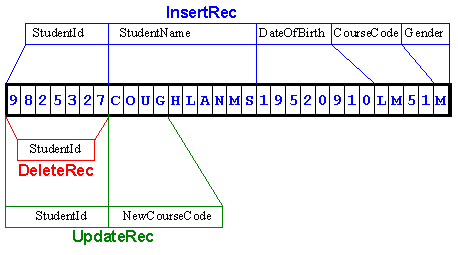
The buffer, in the illustration above, currently contains an insert record. But even though
the record is an insert record, it is still possible to refer to the NewCourseCode, because
all the identifiers, in all the mapped records, are available for use (are active). Of
course, it doesn't make any sense to refer to NewCourseCode because the record is not an
update record. For instance, in this case, the statement
DISPLAY NewCourseCode would display "COUG"
instead of an actual course code.
When a record is read into a shared buffer, it is the programmers responsibility to discover what type of record has been read into the buffer and then, only to refer to the fields that make sense for that type of record. For instance, if an update record has been read into the buffer, then it only makes sense to refer to StudentId and NewCourseCode. We can still access the values in StudentName or DateOfBirth but they will not be meaningful.
Looking at the record above, you might wonder how the programmer can discover what type of record had been read into the buffer. Sometimes we can discover what type of record is in the buffer by examining the record and looking for characteristics, such as a particular value or data type, that are unique to that type of record. But generally, we cannot reliably establish the type of record in the buffer, by simply examining it.
To allow us to distinguish between record types, a special data-item, which identifies the transaction type, is usually inserted into each transaction. This data-item is usually called the transaction type-code. It is usually the first data-item in the transaction record and is usually one character in size, but it can be placed anywhere in the record, be of any size, and be any type of character.
The revised record descriptions.

In the program fragment below, the revised record descriptions are shown. These record descriptions now include a one character field, which stores the type-code inserted into each transaction record to indicate the transaction type. Obviously the transaction file (TRANS.dat) must also be altered so that its actual records contain the type-code.
ENVIRONMENT DIVISION.
INPUT-OUTPUT SECTION.
FILE-CONTROL.
   SELECT TransFile
          ASSIGN TO "TRANS.dat"
          ORGANIZATION IS LINE SEQUENTIAL.
DATA DIVISION.
FILE SECTION.
FD TransFile.
01 InsertRec.
   02 TransCode         PIC X.
   02 StudentId         PIC 9(7).
   02 StudentName.
      03 Surname        PIC X(8).
      03 Initials       PIC XX.
   02 DateOfBirth.
      03 YOBirth        PIC 9(4).
      03 MOBirth        PIC 99.
      03 DOBirth        PIC 99.
   02 CourseCode        PIC X(4).
   02 Gender            PIC X.

01 DeleteRec.
   02 TransCode         PIC X.
   02 StudentId         PIC 9(7).

01 UpdateRec.
   02 TransCode         PIC X.
   02 StudentId         PIC 9(7).
   02 NewCourseCode     PIC X(4).
When you examine the record descriptions above a question may occur to you. TransCode occurs in all the record descriptions - is this legal and how can I refer to the one in DeleteRec?
The answer is - yes! It is legal to use the same identifier in different records (but not in the same record); but in order to uniquely identify the one you want, you must qualify it with the record name. So we can refer to the TransCode in the delete record by using the form TransCode OF DeleteRec. For instance, we might MOVE TransCode OF DeleteRec TO PrnCode.
But even though it is legal to declare TransCode in all the records, and even though we must
declare the storage for TransCode in all the records, we don't actually need to use the
name TransCode in all the records. Since all the records map on to the same area of
storage, it does not matter which TransCode we refer to - they all access the same value in
the record. So if an update record is in the buffer, a statement referring to
TransCode OF InsertRec, will still access the
correct value.
The same logic applies to the StudentId. The StudentId is in the same place in all three record types, so it doesn't matter which one we use - they all access the same area of memory.
When an area of storage must be declared but we don't care what name we give it, we use the
special name - FILLER.
Using FILLER in the transaction records.
In the program fragment below, the final record descriptions are shown. TransCode and
StudentId have the same description and are in the same location in all three records, so
they have been explicitly defined only in the InsertionRec. In the other records, the area
occupied by the two items is named - FILLER.
ENVIRONMENT DIVISION.
INPUT-OUTPUT SECTION.
FILE-CONTROL.
   SELECT TransFile
          ASSIGN TO "TRANS.dat"
          ORGANIZATION IS LINE SEQUENTIAL.

DATA DIVISION.
FILE SECTION.
FD TransFile.
01 InsertRec.
   02 TransCode         PIC X.
   02 StudentId         PIC 9(7).
   02 StudentName.
      03 Surname        PIC X(8).
      03 Initials       PIC XX.
   02 DateOfBirth.
      03 YOBirth        PIC 9(4).
      03 MOBirth        PIC 99.
      03 DOBirth        PIC 99.
   02 CourseCode        PIC X(4).
   02 Gender            PIC X.

01 DeleteRec.
   02 FILLER            PIC X(8).

01 UpdateRec.
   02 FILLER            PIC X(8).
   02 NewCourseCode     PIC X(4).
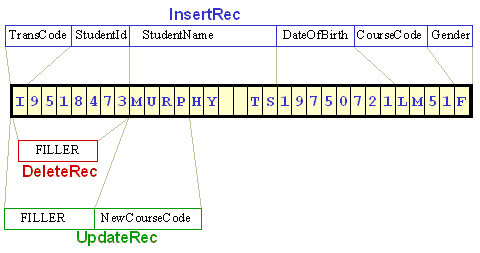
The record schematic for this new record is shown below. Notice how the TransCode and StudentId in the InsertRec map on to the same area of storage as the FILLERs in the other two record types.
COBOL print files
In a business-programming environment, the ability to print reports is an important property
for a programming language. COBOL allows programmers to write to the printer, either
directly or through an intermediate print file. COBOL treats the printer as a serial file,
but uses a special variant of the
WRITE verb to control the placement of lines on the
page.
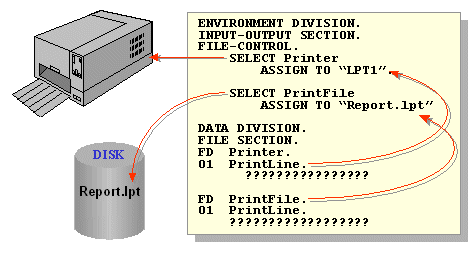
All data coming from, or going to, the peripherals must pass through a file buffer declared in the File Section. The file buffer is associated with the physical device by means of a Select and Assign clause. In the case of a print file, the Select and Assign may assign the print file to an actual physical printing device or, more likely, to a file which is sent to the printer later. In the diagram below one print file is assigned directly to a printer while the other is assigned to a file.
A report is made up of groups of printed lines of different types. There may be heading lines at the beginning of the report, and at the top of each page; there will be detail lines, where the main information of the report is printed; there may be footing lines at the bottom of each page, or at the end of the report.
When we set up a print file we create an FD for the file and a print record for each type of print line that will appear on the report.
For instance, let's suppose we want to write a program to print a Student Details Report which shows the StudentName, StudentId, Gender and CourseCode of each student in the students file.
In the Student Details Report there will be;
-
two Page Heading lines which we can declare as -
01 Heading1. 02 FILLER PIC X(7) VALUE SPACES. 02 FILLER PIC X(25) VALUE "UL Student Details Report". 01 Heading2. 02 FILLER PIC X(21) VALUE "StudentId StudentName". 02 FILLER PIC X(14) VALUE " Gender Course". -
a Detail Line to print the student details which we declare as -
01 StudentDetailLine. 02 PrnStudId PIC B9(7)BB. 02 PrnStudName PIC X(10). 02 PrnGender PIC BBBBX. 02 PrnCourse PIC BBBBX(4). -
a Page Footing line declared as -
01 PageFooting. 02 FILLER PIC X(19) VALUE SPACES. 02 FILLER PIC X(7) VALUE "Page : ". 02 PageNum PIC Z9. -
and a Report Footing line
  01 ReportFooting  PIC X(38)
           VALUE "*** End of Student Details Report ***".
There is a problem with the different kinds of print record we must have in a print file. As
we have seen in the previous section, if a file is declared as having multiple record types,
all the records map on to the same physical area of storage. This doesn't cause any
difficulties if the file is an input file, because only one type of record at a time can be
in the buffer. But as we can see from the print line declarations above, the information in
many print lines is static - set up at compile time - so all the records have to be in the
buffer at the same time. Obviously this is impossible. In fact to prevent the creation of
print records in the
FILE SECTION, there is a COBOL rule which states that,
in the FILE SECTION, the
VALUE clause can only be used with Condition Names (i.e.
it cannot be used to give an initial value to an item).
If the print records cannot be set up in the file's FD entry in the
FILE SECTION. How do we set up a print file?
To set up a print file, the print line records are declared in the
WORKING-STORAGE SECTION; and in the
FILE SECTION, a record the size of the largest
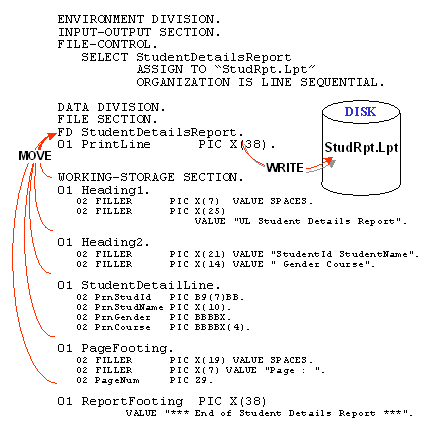
print-line record is declared in the file's FD entry. A line is printed by moving it from
the WORKING-STORAGE SECTION, to the PrintLine record in
the FILE SECTION, and that record is then written to the
print file. This is shown graphically in the illustration below.
The WRITE syntax for writing to print files is more complicated than that used for writing in ordinary Sequential files because it must contain entries to allow us to control the vertical placement of the print lines. The revised write syntax is shown below.
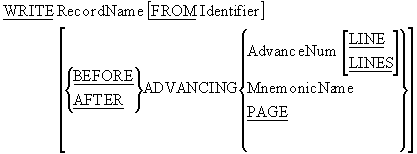
WRITE notes
The ADVANCING clause is used to position the lines on
the page when writing to a print file or a printer.
The PAGE option writes a form feed to the print file or
printer.
MnemonicName refers to a vendor-specific page control command. It is defined in the
SPECIAL-NAMES paragraph.
When writing to print files the WRITE..FROM option is
generally used because the print records are described in the Working Storage Section . When
the WRITE..FROM option is used, the data is moved from
the source area into the record buffer before the contents of the record buffer are written
to the file. The WRITE..FROM is the equivalent of a
MOVE
SourceItem TO RecordBuffer statement followed by
a WRITE RecordBuffer statement.
The example program below implements the Student Details Report specified above;
       >>SOURCE FORMAT IS FREE
IDENTIFICATION DIVISION.
PROGRAM-ID.  StudDetailsRpt.
AUTHOR.  Michael Coughlan.
*> An example program demonstrating COBOL
*> Print files.   This program prints
*> a report based on the Students file

ENVIRONMENT DIVISION.
INPUT-OUTPUT SECTION.
FILE-CONTROL.
   SELECT StudentDetailsReport
          ASSIGN TO "StudRpt.Lpt"
          ORGANIZATION IS LINE SEQUENTIAL.

   SELECT StudentFile
          ASSIGN TO "STUDENTS.dat"
          ORGANIZATION IS LINE SEQUENTIAL.

DATA DIVISION.
FILE SECTION.
FD StudentFile.
01 StudentRec.
   88  EndOfStudentFile  VALUE HIGH-VALUES.
   02  StudentId      PIC 9(7).
   02  StudentName.
       03 Surname     PIC X(8).
       03 Initials    PIC XX.
   02  DateOfBirth.
       03 YOBirth     PIC 9(4).
       03 MOBirth     PIC 9(2).
       03 DOBirth     PIC 9(2).
   02  CourseCode     PIC X(4).
   02  Gender         PIC X.

FD StudentDetailsReport.
01 PrintLine          PIC X(38).

WORKING-STORAGE SECTION.
01 Heading1.
   02 FILLER          PIC X(7)  VALUE SPACES.
   02 FILLER          PIC X(25)
                      VALUE "UL Student Details Report".

01 Heading2.
   02 FILLER          PIC X(21)
                      VALUE "StudentId StudentName".
   02 FILLER          PIC X(14)
                      VALUE " Gender Course".

01 StudentDetailLine.
   02 PrnStudId       PIC B9(7)BB.
   02 PrnStudName     PIC X(10).
   02 PrnGender       PIC BBBBX.
   02 PrnCourse       PIC BBBBX(4).

01 PageFooting.
   02 FILLER          PIC X(19) VALUE SPACES.
   02 FILLER          PIC X(7) VALUE "Page : ".
   02 PrnPageNum      PIC Z9.

01 ReportFooting      PIC X(38)
           VALUE "*** End of Student Details Report ***".

01 PageItems.
   02 LineCount          PIC 99 VALUE ZEROS.
      88 NewPageRequired VALUE 50 THRU 99.
   02 PageNum            PIC 99 VALUE ZEROS.

PROCEDURE DIVISION.
PrintStudentReport.
   OPEN INPUT StudentFile
   OPEN OUTPUT StudentDetailsReport
   PERFORM PrintPageHeadings
   READ StudentFile
        AT END SET EndOfStudentFile TO TRUE
   END-READ
   PERFORM PrintReportBody UNTIL EndOfStudentFile
   WRITE PrintLine FROM ReportFooting
         AFTER ADVANCING 3 LINES
   CLOSE StudentFile, StudentDetailsReport
   STOP RUN.

PrintReportBody.
   IF NewPageRequired
      ADD 1 TO PageNum
      MOVE PageNum TO PrnPageNum
      WRITE PrintLine FROM PageFooting
            AFTER ADVANCING 3 LINES
      PERFORM PrintPageHeadings
   END-IF
   MOVE StudentId TO PrnStudId
   MOVE StudentName TO PrnStudName
   MOVE Gender TO PrnGender
   MOVE CourseCode TO PrnCourse
   WRITE PrintLine FROM StudentDetailLine
        AFTER ADVANCING 1 LINE
   ADD 1 TO LineCount
   READ StudentFile
        AT END SET EndOfStudentFile TO TRUE
   END-READ.

PrintPageHeadings.
   WRITE PrintLine FROM Heading1
         AFTER ADVANCING PAGE
   WRITE PrintLine FROM Heading2
         AFTER ADVANCING 2 LINES
   MOVE 3 TO LineCount.
Variable length records
COBOL programs normally process fixed-length records but sometimes files contain records of different lengths. For instance, the transaction file introduced in the first section, contains three different types of fixed-length record and an ordinary text file contains records whose size is differs from record to record.
This section demonstrates how files, containing variable-length records, may be declared and processed.
The File Description (FD) entry was introduced in the first tutorial on Sequential files.
But the entry shown in that tutorial was very simple; it consisted of the letters FD
followed by the filename. An FD entry can be more complicated than this, and can have a
large number of subordinate clauses (see your vendor manual or help files). Among these
clauses is the
RECORD IS VARYING IN SIZE clause.
The RECORD IS VARYING IN SIZE clause allows us to
specify that a file contains variable length records. The syntax diagram for this clause is
shown below.

Notes
The RECORD IS VARYING IN SIZE clause, without the
DEPENDING ON phrase, is not strictly required because
the compiler can this information out from the record sizes. That is why it was not included
in the multiple record-type declarations in the first section.
The RecordSize#i in the DEPENDING ON phase must be an
elementary unsigned integer data-item declared in the
WORKING-STORAGE SECTION.
Examples
FD TransFile
   RECORD IS VARYING IN SIZE
   FROM 8 TO 31 CHARACTERS.

FD Stringfile
   RECORD IS VARYING IN SIZE
   FROM 1 TO 80 CHARACTERS
   DEPENDING ON StringSize.
When a record is read from a file, defined with the
RECORD IS VARYING IN SIZE.. DEPENDING ON phrase, the
size of the record read into the buffer is moved into the data-item RecordSize#i (see
the example program below).
To write to a file, defined with the
RECORD IS VARYING IN SIZE.. DEPENDING ON phrase, the
size of the record to be written must first be moved to RecordSize#i data-item, and
then the WRITE statement must be executed.
The example program below introduces a number of new techniques and concepts;
- The filenames we have used so far have been defined at compile-time. In this example we see how we can set up a file so that the file name is accepted from the user at run-time.
-
This program demonstrates variable-length records that are defined both with, and
without, the
DEPENDING ONclause. - This program demonstrates how condition names set on the transaction type code can be used to discover which type of transaction has been read into the record buffer. Notice how reading a record into the record buffer automatically sets one of the condition names to true.
- This program uses Reference Modification to display the variable-length string that has been read into the record buffer. The form StringRec(1:StringSize) extracts the characters in StringRec, from the character at position 1, to the character at position StringSize.
       >>SOURCE FORMAT IS FREE
IDENTIFICATION DIVISION.
PROGRAM-ID.  VarLenRecs.
AUTHOR.  Michael Coughlan.
*> This program uses variable length records.
*> It demonstrates how condition names may be used to
*> discover which type of record is in the record buffer.
*> It shows how a file name may be assigned to a file
*> at run time rather than compile time.
*> It uses Reference Modification to extract the input
*> string from the record buffer.

ENVIRONMENT DIVISION.
INPUT-OUTPUT SECTION.
FILE-CONTROL.
   SELECT StringFile
          ASSIGN TO StringFileName
          ORGANIZATION IS LINE SEQUENTIAL.

   SELECT TransFile
          ASSIGN TO "TRANS.dat"
          ORGANIZATION IS LINE SEQUENTIAL.

DATA DIVISION.
FILE SECTION.
FD TransFile
   RECORD IS VARYING IN SIZE
   FROM 8 TO 31 CHARACTERS.
01 InsertRec.
   88 EndOfTrans        VALUE HIGH-VALUES.
   02 TransCode         PIC X.
      88 DoInsert       VALUE "I".
      88 DoDelete       VALUE "D".
      88 DoUpdate       VALUE "U".
   02 StudentId         PIC 9(7).
   02 StudentName.
      03 Surname        PIC X(8).
      03 Initials       PIC XX.
   02 DateOfBirth.
      03 YOBirth        PIC 9(4).
      03 MOBirth        PIC 99.
      03 DOBirth        PIC 99.
   02 CourseCode        PIC X(4).
   02 Gender            PIC X.

01 DeleteRec.
   02 FILLER            PIC X(8).

01 UpdateRec.
   02 FILLER            PIC X(8).
   02 NewCourseCode     PIC X(4).

FD Stringfile
   RECORD IS VARYING IN SIZE
   FROM 1 TO 80 CHARACTERS
   DEPENDING ON StringSize.
01 StringRec            PIC X(80).
   88 EndOfStrings      VALUE HIGH-VALUES.


WORKING-STORAGE SECTION.
01 StringSize           PIC 99.
01 StringFileName       PIC X(20).

PROCEDURE DIVISION.
Begin.
   DISPLAY "Enter the name of the string file :- "
      WITH NO ADVANCING
   ACCEPT StringFileName.
   OPEN INPUT StringFile.
   OPEN INPUT TransFile.
   READ TransFile
     AT END SET EndOfTrans TO TRUE
   END-READ
   PERFORM DisplayTransactions
           UNTIL EndOfTrans

   READ StringFile
     AT END SET EndOfStrings TO TRUE
   END-READ
   PERFORM UNTIL EndOfStrings
      DISPLAY "Valid Rec - " StringRec(1:StringSize) "***"
      READ StringFile
        AT END SET EndOfStrings TO TRUE
      END-READ
   END-PERFORM

   CLOSE StringFile, TransFile.
   STOP RUN.

DisplayTransactions.
   EVALUATE TRUE
     WHEN DoInsert DISPLAY "Insert - " InsertRec
     WHEN DoDelete DISPLAY "Delete - " DeleteRec
     WHEN DoUpdate DISPLAY "Update - " UpdateRec
     WHEN OTHER DISPLAY "Error - " InsertRec
   END-EVALUATE
   READ TransFile
     AT END SET EndOfTrans TO TRUE
   END-READ.