The aim of this unit is to provide to provide you with a solid understanding of the UNSTRING verb.
Introduction
By the end of this unit you should:
- Understand how the UNSTRING works
- Be able to use the UNSTRING to divide a string into sub-strings
The UNSTRING verb
The UNSTRING is used to divide a string into sub-strings.
The examples below show how the UNSTRING is used.
The first example breaks a name string into its three constituent part - the first name , second name and surname. For instance the string "John Joseph Ryan" is broken into the three strings "John", "Joseph" and "Ryan".
The second example breaks an address string (where the parts of the address are separated from one another by commas) into separate address lines. The address lines are stored in a six element table.
Since not all addresses will have six parts exactly, we use the TALLYING clause to discover how many parts there are.
UNSTRING FullName DELIMITED BY ALL SPACES
    INTO FirstName, SecondName, Surname
END-UNSTRING.

UNSTRING CustAddress DELIMITED BY ","
   INTO AdrLine(1), AdrLine(2), AdrLine(3),
        AdrLine(4), AdrLine(5), AdrLine(6)
   TALLYING IN AdrLinesUsed
END-UNSTRING.
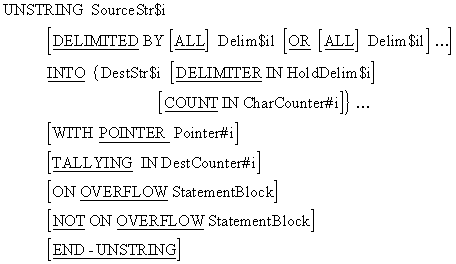
| Delim$il | Character or set of characters in the source string that terminate data transfer to a particular destination String |
| HoldDelim$i | Holds the delimiter that caused data transfer to a particular destination string to terminate. |
| CharCounter#i | Is associated with a particular destination string and holds a count of the characters copied into it. |
| Pointer#i | Points to the position in the source string from which the next character will be taken. |
| DestCounter#i | Holds the count of the number of destination strings affected by the UNSTRING operation. |
The UNSTRING copies characters from the source string, to the destination string, until a condition is encountered that terminates data movement.
When data movement ends for a particular destination string, the next destination string becomes the receiving area and characters are copied into it until once again a terminating condition is encountered.
Characters are copied from the source string to the destination strings according to the rules for alphanumeric moves. There is space filling.
When the DELIMITED BY clause is used data movement from the source string to the current destination string ends when either:
- a delimiter is encountered in the source string
- the end of the source string is reached.
When the DELIMITED BY clause is not used, data movement from the source string to the current destination string ends when either;
- the destination string is full
- the end of the source string is reached
The UNSTRING statement terminates when either;
- All the characters in the source string have been examined
- All the destination strings have been processed
- Some error condition is encountered (such as the pointer pointing outside the source string).
- Where a literal can be used any figurative constant can be used except the ALL (literal).
- When a figurative constant is used then its length is one character.
- Characters are moved from the source string to the destination strings according to the rules for the MOVE, with space filling if required.
- The delimiter is moved into HoldDelim$i according to the rules for the MOVE.
- The DELIMITER IN and COUNT IN phrases may be specified only if the DELIMITED BY phrase is used.
ON OVERFLOW
The ON OVERFLOW is activated if :-
- The unstring pointer (Pointer#i) is not pointing to a character position within the source string when the UNSTRING executes.
- All the destination strings have been processed but there are still valid unexamined characters in the source string.
The statements following the NOT ON OVERFLOW are executed if the UNSTRING is about to terminate successfully.
COUNT IN
The COUNT IN clause is associated with a particular destination string and holds a count of the number of characters passed to the destination string.
TALLYING IN
Only one TALLYING clause can be used with each UNSTRING . It holds a count of the number of destination strings affected by the UNSTRING operation.
WITH POINTER
When the WITH POINTER clause is used the Pointer#i holds the position of the next non-delimiter character to be examined in the source string.
Pointer#i must be large enough to hold a value one greater than the size of the source string.
ALL
When the ALL phrase is used, contiguous delimiters are treated as if only one delimiter had been encountered.
If the ALL is not used, contiguous delimiters will result in spaces being sent to some of the destination strings
DELIMITER IN
A DELIMITER IN clause is associated with a particular destination string. HoldDelim$i holds the delimiter that was encountered in the source string.
If the DELIMITER IN phrase is used with the ALL phrase then only one occurrence of the delimiter will be moved to HoldDelim$i.
DELIMITED BY
When the DELIMITED BY phrase is used, characters are examined in the source string and transferred to the current destination string until one of the specified delimiters is encountered or the end the source string is reached.
If there is not enough room in the destination string to take all the characters that are sent to it from the source string then the remaining characters will be truncated/lost.
When the delimiter is encountered in the source string, the next destination string becomes current and characters are transferred into it, from the source string.
Delimiters are not transferred or counted in CharCounter#i.
UNSTRING examples
This section starts with 6 short examples exploring various aspects the UNSTRING.
Example 7 is a longer and more practical example
Finally the section ends with an example program that uses the UNSTRING.
When you view these examples start by carefully examining the UNSTRING statement. See if you can figure out what it's going to do (you may need to review the material above for this).
When you are happy with your prediction step through the example and see if you were correct.
If your prediction is not correct try to discover what misunderstanding has led to your error.
Left click or PageDown to go to the next frame and right click or press PageUp to go to the previous frame.The WITH POINTER phrase is often very useful because it means that we don't have to unpack the whole source string in one go..
In this example, we unpack a full name, any number of Christian names followed by a surname, and display the names one after another.
Click on the diagram below to step through the animation. Left click or PageDown to go to the next step and right click or press PageUp to go to the previous step.Comma delimited or comma separated values (CSV) is a file format widely used in the computing industry.
It allows data to be transferred between applications with incompatible file formats (Excel, for example, can save its spreadsheets in this form).
But before the records in a CSV format file can be processed they must be unpacked into individual fields.
In this example, a file of customer records is held in file with a CSV-like format. Each record contains a customer name, a customer address and the customer balance. The fields are separated from one another by commas. The individual parts of the customer address are separated by the slash "/" character.
An example record is -
Michael Ryan,3 Winchester Drive/Castletroy/Limerick/Ireland,0022456
The program below reads the file, unpacks each the record into separate fields and writes the unpacked record to a new file.
IDENTIFICATION DIVISION.
PROGRAM-ID. CDFILE.
AUTHOR. Michael Coughlan.

ENVIRONMENT DIVISION.
INPUT-OUTPUT SECTION.
FILE-CONTROL.
     SELECT CommaDelimitedFile ASSIGN TO "CDFILE.dat".
     SELECT CustomerFile ASSIGN TO "CustFile.dat".

DATA DIVISION.
FILE SECTION.
FD  CommaDelimitedFile.
01  CommaDelimitedRec     PIC X(205).
    88 EndOfFile   VALUE HIGH-VALUES.

FD  CustomerFile.
01  CustomerRec.
    02 CustName    PIC X(40).
    02 AddrLinesUsed      PIC 9.
    02 CustAddress.
       03 AddrLine PIC X(25) OCCURS 1 TO 6
                   DEPENDING ON AddrLinesUsed.
    02 CustBalance PIC 9(5)V99.

WORKING-STORAGE SECTION.
01  TempAddress    PIC X(150).
01  TempBalance    PIC X(7).
01  AdjustedBalance REDEFINES TempBalance PIC 9(5)V99.

PROCEDURE DIVISION.
Begin.
    OPEN INPUT CommaDelimitedFile
    OPEN OUTPUT CustomerFile
    READ CommaDelimitedFile
       AT END SET EndOfFile TO TRUE
    END-READ

    PERFORM UNTIL EndOfFile
       MOVE ZEROS TO AddrLinesUsed
       UNSTRING CommaDelimitedRec DELIMITED BY ","
           INTO CustName, TempAddress, TempBalance
       UNSTRING TempAddress DELIMITED BY "/"
           INTO AddrLine(1), AddrLine(2), AddrLine(3),
                AddrLine(4), AddrLine(5), AddrLine(6)
                TALLYING IN AddrLinesUsed
       MOVE AdjustedBalance TO CustBalance
       WRITE CustomerRec
       READ CommaDelimitedFile
          AT END SET EndOfFile TO TRUE
       END-READ
    END-PERFORM
    CLOSE CommaDelimitedFile, CustomerFile
    STOP RUN.
Combined example
This example takes a string, containing a name consisting of any number of Christian names followed by a surname, and converts it by reducing the Christian names to their first letters followed by a period.
For example "Michael John Tim James Ryan" becomes "M.J.T.J. Ryan".
01 OldName  PIC X(80).

01 TempName.
   02 NameInitial  PIC X.
   02 FILLER       PIC X(15).

01 NewName         PIC X(30).

01 Pointers.
   02 StrPtr       PIC 99 VALUE 1.
   02 UnstrPtr     PIC 99 VALUE 1.
88 NameProcessed VALUE 81.Click on the diagram below to step through the animation. Left click or PageDown to go to the next step and right click or press PageUp to go to the previous step.