The internal representation of data can be an important consideration for program
efficiency. Unfortunately the default representation used by COBOL for numeric data items
can negatively impact the speed of computations. A more efficient format for numeric data
can be specified by using the USAGE clause.
This unit introduces the concept of internal data representations, it discusses the default
representation used in COBOL and outlines how that representation, used for numeric data,
might cause inefficiencies.
The syntax of the USAGE clause is given and the various
options explained.
The SYNCHRONIZED clause is introduced and a generalized
example given.
By the end of this unit you should -
- Know that text is stored in a computer using some encoding sequence.
- Understand the problems caused by storing numeric data as ASCII digits.
-
Be able to use use the
USAGE clause to change the
way numeric data is stored in the computer.
-
Know when and how to use the
SYNCHRONIZED clause.
Computers store their data in the form of binary digits. Apart from cardinal numbers
(positive integers) all other data stored in the computer's memory uses some sort of
formatting convention.
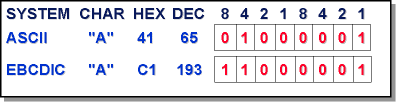
Text data, for example, is stored using an encoding sequence like ASCII or EBCDIC. An
encoding system is simply a convention which specifies that a particular set of bits is to
be used to represent a particular character. For instance, the diagram below shows the bit
configuration used to represent an upper case "A" in the ASCII and the EBCDIC encoding
sequences.
Numeric data can be held as text digits (ASCII digits) or as pure binary numbers (in the
case of cardinal values), or as twos complement binary numbers (in the case of integers), or
as decimal numbers (using BCD), or as real numbers (using a real number format such as the
IEEE specification for floating point numbers).
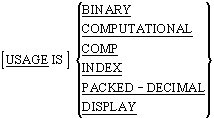
The USAGE clause is used to specify how a data item is
to be stored in the computer's memory. Every variable declared in a COBOL program has a
USAGE clause - even when no explicit clause is
specified. When there is no explicit USAGE clause, the
default - USAGE IS DISPLAY - is applied.
For text items, or for numeric items that are not going to be used in a computation (Account
Numbers, Phone Numbers etc.), the default of
USAGE IS DISPLAY presents no problems; but for numeric
items upon which some calculation is to be performed the default usage is not the most
efficient way to store the data.
When numeric items (PIC 9 items) have a usage of
DISPLAY, they are stored as ASCII digits (see the ASCII
digits 0-9 in the ASCII table below).
Consider the following program fragment. What would happen if computations were done
directly on numbers stored in this format?
   ? ? ? ? ? ? ? ? ? ? ? ?
WORKING-STORAGE SECTION.
01 Num1    PIC 9 VALUE 4.
01 NUM2    PIC 9 VALUE 1.
01 Num3    PIC 9 VALUE ZERO.
   ? ? ? ? ? ? ? ? ? ? ? ?

PROCEDURE DIVISION.
Begin.
   ? ? ? ? ? ? ? ? ? ? ? ?
   ADD Num1, Num2 GIVING Num3
   ? ? ? ? ? ? ? ? ? ? ? ?
Since none of the data items have an explicit
USAGE clause they default to -
USAGE IS DISPLAY. This means that the values in the
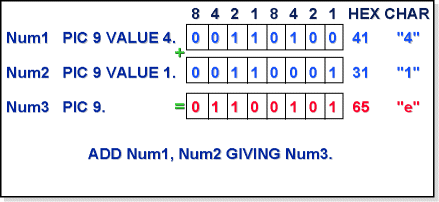
variables Num1, Num2 and Num3 are stored as ASCII digits. How does this effect calculations?
If you examine the ASCII table below you will see that the digit 4 (the value in Num1) is
encoded as
00110100
and the digit 1 is encoded as 00110001.
When these binary numbers are added together the result is
01100101
which is the ASCII code for the lower case letter "e".
The sum 4 + 1 = e does not compute.
When calculations are done with numeric data items whose
USAGE IS DISPLAY, the computer has to convert the
numeric values to their binary equivalents before the calculation can be done. When the
result has been computed the computer has to reconvert it to ASCII digits. Conversion to and
from ASCII digits slows down computations.
For this reason, data that is heavily involved in computation is often declared using one of
the usages optimized for computation such as
USAGE IS COMPUTATIONAL.
ASCII Table
| Char |
Dec |
Hex |
Binary |
|
^@ (NUL)
|
0
|
00
|
00000000
|
|
^A (SOX)
|
1
|
01
|
00000001
|
|
^B (STX)
|
2
|
02
|
00000010
|
|
^C (ETX)
|
3
|
03
|
00000011
|
|
^D (EOT)
|
4
|
04
|
00000100
|
|
^E (ENQ)
|
5
|
05
|
00000101
|
|
^F (ACK)
|
6
|
06
|
00000110
|
|
^G (BEL)
|
7
|
07
|
00000111
|
|
^H (BS)
|
8
|
08
|
00001000
|
|
^I (HT)
|
9
|
09
|
00001001
|
|
^J (NL)
|
10
|
0A
|
00001010
|
|
^K (VT)
|
11
|
0B
|
00001011
|
|
^L (NP)
|
12
|
0C
|
00001100
|
|
^M (CR)
|
13
|
0D
|
00001101
|
|
^N (SO)
|
14
|
0E
|
00001110
|
|
^O (SI)
|
15
|
0F
|
00001111
|
|
^P (DLE)
|
16
|
10
|
00010000
|
|
^Q (DS1)
|
17
|
11
|
00010001
|
|
^R (DS2)
|
18
|
12
|
00010010
|
|
^S (DS3)
|
19
|
13
|
00010011
|
|
^T (DC4)
|
20
|
14
|
00010100
|
|
^U (NAK)
|
21
|
15
|
00010101
|
|
^V (SYN)
|
22
|
16
|
00010110
|
|
^W (ETB)
|
23
|
17
|
00010111
|
|
^X (CAN)
|
24
|
18
|
00011000
|
|
^Y (EM)
|
25
|
19
|
00011001
|
|
^Z (SUB)
|
26
|
1A
|
00011010
|
|
^[ (ESC)
|
27
|
1B
|
00011011
|
|
^\ (FS)
|
28
|
1C
|
00011100
|
|
^] (GS)
|
29
|
1D
|
00011101
|
|
^^ (RS)
|
30
|
1E
|
00011110
|
|
^_ (US)
|
31
|
1F
|
00011111
|
|
(SP)
|
32
|
20
|
00100000
|
|
!
|
33
|
21
|
00100001
|
|
"
|
34
|
22
|
00100010
|
|
#
|
35
|
23
|
00100011
|
|
$
|
36
|
24
|
00100100
|
|
%
|
37
|
25
|
00100101
|
|
&
|
38
|
26
|
00100110
|
|
'
|
39
|
27
|
00100111
|
|
(
|
40
|
28
|
00101000
|
|
)
|
41
|
29
|
00101001
|
|
*
|
42
|
2A
|
00101010
|
|
+
|
43
|
2B
|
00101011
|
|
,
|
44
|
2C
|
00101100
|
|
-
|
45
|
2D
|
00101101
|
|
.
|
46
|
2E
|
00101110
|
|
/
|
47
|
2F
|
00101111
|
|
0
|
48
|
30
|
00110000
|
|
1
|
49
|
31
|
00110001
|
|
2
|
50
|
32
|
00110010
|
|
3
|
51
|
33
|
00110011
|
|
4
|
52
|
34
|
00110100
|
|
5
|
53
|
35
|
00110101
|
|
6
|
54
|
36
|
00110110
|
|
7
|
55
|
37
|
00110111
|
|
8
|
56
|
38
|
00111000
|
|
9
|
57
|
39
|
00111001
|
|
:
|
58
|
3A
|
00111010
|
|
;
|
59
|
3B
|
00111011
|
|
<
|
60
|
3C
|
00111100
|
|
=
|
61
|
3D
|
00111101
|
|
>
|
62
|
3E
|
00111110
|
|
?
|
63
|
3F
|
00111111
|
|
@
|
64
|
40
|
01000000
|
|
A
|
65
|
41
|
01000001
|
|
B
|
66
|
42
|
01000010
|
|
C
|
67
|
43
|
01000011
|
|
D
|
68
|
44
|
01000100
|
|
E
|
69
|
45
|
01000101
|
|
F
|
70
|
46
|
01000110
|
|
G
|
71
|
47
|
01000111
|
|
H
|
72
|
48
|
01001000
|
|
I
|
73
|
49
|
01001001
|
|
J
|
74
|
4A
|
01001010
|
|
K
|
75
|
4B
|
01001011
|
|
L
|
76
|
4C
|
01001100
|
|
M
|
77
|
4D
|
01001101
|
|
N
|
78
|
4E
|
01001110
|
|
O
|
79
|
4F
|
01001111
|
|
P
|
80
|
50
|
01010000
|
|
Q
|
81
|
51
|
01010001
|
|
R
|
82
|
52
|
01010010
|
|
S
|
83
|
53
|
01010011
|
|
T
|
84
|
54
|
01010100
|
|
U
|
85
|
55
|
01010101
|
|
V
|
86
|
56
|
01010110
|
|
W
|
87
|
57
|
01010111
|
|
X
|
88
|
58
|
01011000
|
|
Y
|
89
|
59
|
01011001
|
|
Z
|
90
|
5A
|
01011010
|
|
[
|
91
|
5B
|
01011011
|
|
\
|
92
|
5C
|
01011100
|
|
]
|
93
|
5D
|
01011101
|
|
^
|
94
|
5E
|
01011110
|
|
_
|
95
|
5F
|
01011111
|
|
`
|
96
|
60
|
01100000
|
|
a
|
97
|
61
|
01100001
|
|
b
|
98
|
62
|
01100010
|
|
c
|
99
|
63
|
01100011
|
|
d
|
100
|
64
|
01100100
|
|
e
|
101
|
65
|
01100101
|
|
f
|
102
|
66
|
01100110
|
|
g
|
103
|
67
|
01100111
|
|
h
|
104
|
68
|
01101000
|
|
i
|
105
|
69
|
01101001
|
|
j
|
106
|
6A
|
01101010
|
|
k
|
107
|
6B
|
01101011
|
|
l
|
108
|
6C
|
01101100
|
|
m
|
109
|
6D
|
01101101
|
|
n
|
110
|
6E
|
01101110
|
|
o
|
111
|
6F
|
01101111
|
|
p
|
112
|
70
|
01110000
|
|
q
|
113
|
71
|
01110001
|
|
r
|
114
|
72
|
01110010
|
|
s
|
115
|
73
|
01110011
|
|
t
|
116
|
74
|
01110100
|
|
u
|
117
|
75
|
01110101
|
|
v
|
118
|
76
|
01110110
|
|
w
|
119
|
77
|
01110111
|
|
x
|
120
|
78
|
01111000
|
|
y
|
121
|
79
|
01111001
|
|
z
|
122
|
7A
|
01111010
|
|
{
|
123
|
7B
|
01111011
|
|
|
|
124
|
7C
|
01111100
|
|
}
|
125
|
7D
|
01111101
|
|
~
|
126
|
7E
|
01111110
|
|
^? (DEL)
|
127
|
7F
|
01111111
|
USAGE notes
-
The
USAGE clause may be used with any data
description entry except those with level numbers of 66 or 88.
-
When the
USAGE clause is declared for a group item,
the usage specified is applied to every item in the group. The group item itself is
still treated as an alphanumeric data-item (see example program below).
-
USAGE IS COMPUTATIONAL or
COMP or
BINARY are synonyms of one another.
-
The
USAGE IS INDEX clause is used to provide an
optimized table subscript. When a table is the target of a
SEARCH statement it must have an associated index
item (see the Search Tutorial).
USAGE rules
-
Any item declared with
USAGE IS INDEX can only
appear in:
- A SEARCH or
SET statement
- A relation condition
- The USING phrase of the
PROCEDURE DIVISION
- The USING phrase of the
CALL statement
-
The picture string of a
COMP or
PACKED-DECIMAL item can contain only the symbols 9,
S, V and/or P.
-
The picture clause used for
COMP or
PACKED-DECIMAL items must be numeric.
USAGE examples
01 Num1 PIC 9(5)V99 USAGE IS COMP.
01 Num2 PIC 99 USAGE IS PACKED-DECIMAL.
01 IdxItem USAGE IS INDEX.

01 GroupItems USAGE IS COMP.
   02 Item1 PIC 999.
   02 Item2 PIC 9(4)V99.
   02 New1 PIC S9(5) COMP SYNC.

01 Group2.
   02 NumItem1 PIC 9(3)V99 USAGE IS COMP.
   02 NumItem2 PIC 99V99   USAGE IS COMP.
COMP/COMPUTATIONAL/BINARY
COMP items are held in memory as pure binary two's
complement numbers. The storage requirements for fields described as
COMP are as follows:
| Number of Digits |
Storage Required. |
| PIC 9(1 to 4) |
1 Word (2 Bytes) |
| PIC 9(5 to 9) |
1 LongWord (4 Bytes) |
| PIC 9(10 to 18) |
1QuadWord (8 Bytes) |
PACKED-DECIMAL
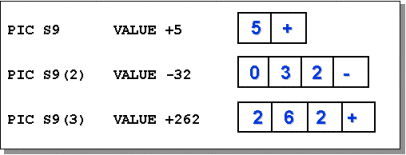
Data-items declared as PACKED-DECIMAL are held in
binary-coded-decimal (BCD) form.
Instead of representing the value as a single binary number, the binary value of each digit
is held in a nibble (half a byte). The sign is held in a separate nibble in the least
significant position of the item (see diagram below).
General USAGE notes
The USAGE clause is one of the areas where many vendors
have introduced extensions to the COBOL standard. It is not uncommon to see
COMP-1, COMP-2,
COMP-3, COMP-4,
COMP-5 and
POINTER usage items in programs written using these
extensions.
Even though COMP-1 and
COMP-2 are extensions to the COBOL standard, vendors
seem to use identical representations for these usages.
COMP-1 is usually defined as a single precision,
floating point number, adhering to the IEEE specification for such numbers (Real or Float in
typed languages) and COMP-2 is usually defined as a
double precision, floating point number (LongReal or Double in typed languages).
The SYNCHRONIZED clause is sometimes used with
USAGE IS COMP or
USAGE IS INDEX items. It is used to optimize speed of
processing but it does so at the expense of increased storage requirements.
Many computer memories are organized in such a way that there are natural addressing
boundaries - such as word boundaries. If no special action is taken some data items in
memory may straddle theses boundaries. This may cause a processing overhead as the CPU may
need two fetch cycles to retrieve the data from memory.
The SYNCHRONIZED clause is used to explicitly align
COMP and INDEX items
along their natural word boundaries. Without the
SYNCHRONIZED clause, data-items are aligned on byte
boundaries.
The word SYNC can be used instead of
SYNCHRONIZED.
The effect of the synchronized clause is implementation dependant. You will need to read
your vendor manual to see how it works on your computer (in some cases it may have no
effect).
For the purpose of illustrating how the
SYNCHRONIZED clause works let us assume that a COBOL
program is running on a word-oriented computer where the CPU fetches data from memory a word
at a time.
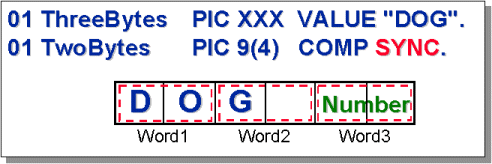
In this program we want to perform a calculation on the number stored in the variable
TwoBytes (as declared in the diagram below). Because of the way the data items have
been declared, the number stored in TwoBytes straddles a word boundary.
In order to use the number, the CPU has to execute two fetch cycles - one to get the first
part of the number in Word2 and the second to get the second part of the number in Word3.
This double fetch slows down calculations.
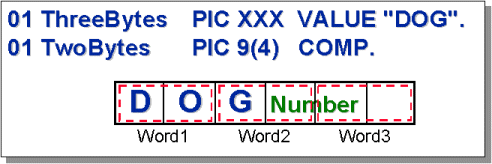
Now consider the impact of using the
SYNCHRONIZED clause. The number in TwoBytes is
now aligned along the word boundary, so the CPU only has to do one fetch cycle to retrieve
the number from memory. This speeds up processing but at the expense of wasting some storage
(the second byte of Word2 is no longer used).